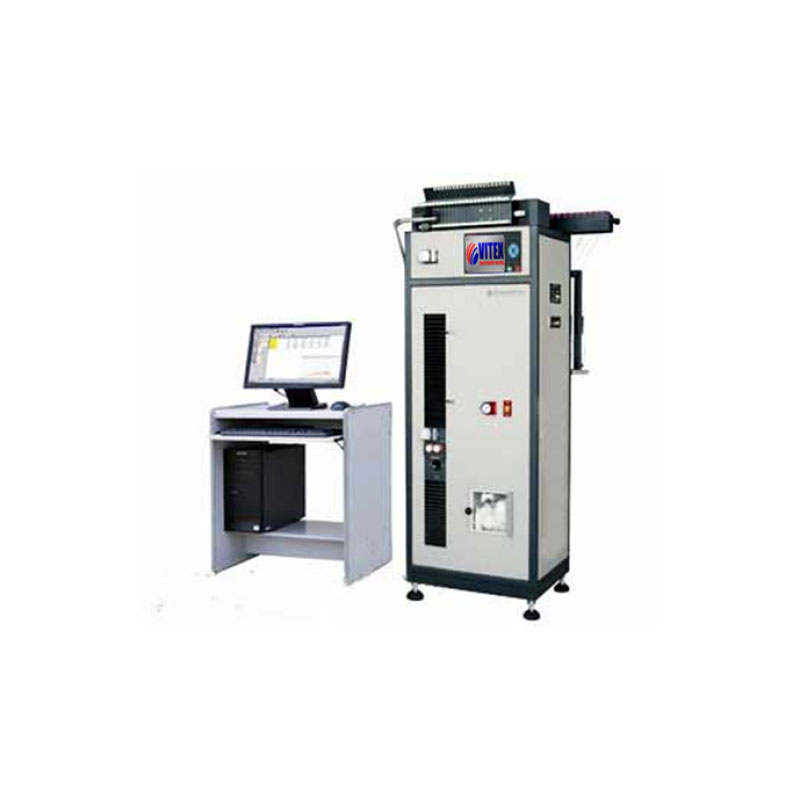
VIT 400C – Automatic Single Yarn Strength Tester

[product_tags_no_comma_alt]

Application

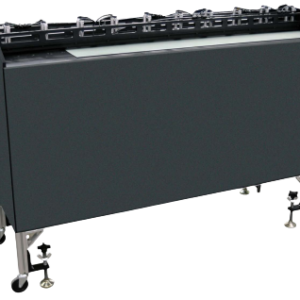
The Automatic Single Yarn Strength Tester determines the breaking strength and elongation rate of single yarns made from cotton, wool, and other materials up to 6000cN, with air-driven clamps. It can fully automate the testing of up to 20 cops simultaneously, ensuring efficiency and accuracy.

Features

  • Operates on the CRE (Constant Rate of Extension) principle, controlled via computer software.
  • Automated yarn feeding and clamping for fast, damage-free testing.
  • Equipped with a waste yarn collecting device for maintaining a clean testing environment.
  • Simultaneous testing of up to 20 cops.
  • Includes software for computer control and offers printing options through a built-in or additional printer.

Specification

Standards Compliance:

  • ASTM D2256
  • ISO2062
  • GB/T398, GB5324, GB/T14344
  • BS, JIS, AS, CAN/CGSB

Technical Specifications

  • Power / Air: 220V 50 Hz, 0.4 ~ 0.8mPa
  • Weight: 140 Kg
  • Dimensions: 550 x 450 x 1600 mm (L x W x H)
  • Test range: 20cN ~ 6000cN
  • Accuracy: ≤ 1% F.S.
  • Sampling range: 0 ~ 9m
  • Pre-tension load: 0 ~ 100cN, adjustable
  • Elongation range: 800mm
  • Gauge length: 250mm (stretching rate 220%), 500mm (stretching rate 160%)
  • Tensile speed: 50 ~ 5000mm/min, adjustable

Testing Method

Instrument Calibration Calibration should be performed regularly or when force values appear biased:

  1. Warm up the instrument for 30 minutes after powering on.
  2. Select “Force Calibration” from the calibration interface.
  3. Set the base reading by moving the cursor to “0” and pressing “confirm.”
  4. Hang a 1000cN weight, move the cursor to “Full” and press “confirm” to record “1000+base.”
  5. Finalize calibration by selecting “Calibration” and confirming that the right-side display reads “1000.”

Test Procedure

  1. Ensure air pressure is within 0.4mPa to 0.8mPa.
  2. Power on the printer and clamp the yarn.
  3. Access the instrument’s operating interface and set testing parameters such as Test Time, Yarn Number, Bobbins, Elongation, and Speed.
  4. Start the test by selecting “F2.”
  5. In case of power failure, resume testing by selecting “F1” followed by “F2” to continue from the last position.

Coming Soon

Application

The Automatic Single Yarn Strength Tester determines the breaking strength and elongation rate of single yarns made from cotton, wool, and other materials up to 6000cN, with air-driven clamps. It can fully automate the testing of up to 20 cops simultaneously, ensuring efficiency and accuracy.

Features

  • Operates on the CRE (Constant Rate of Extension) principle, controlled via computer software.
  • Automated yarn feeding and clamping for fast, damage-free testing.
  • Equipped with a waste yarn collecting device for maintaining a clean testing environment.
  • Simultaneous testing of up to 20 cops.
  • Includes software for computer control and offers printing options through a built-in or additional printer.

Specification

Standards Compliance:

  • ASTM D2256
  • ISO2062
  • GB/T398, GB5324, GB/T14344
  • BS, JIS, AS, CAN/CGSB

Technical Specifications

  • Power / Air: 220V 50 Hz, 0.4 ~ 0.8mPa
  • Weight: 140 Kg
  • Dimensions: 550 x 450 x 1600 mm (L x W x H)
  • Test range: 20cN ~ 6000cN
  • Accuracy: ≤ 1% F.S.
  • Sampling range: 0 ~ 9m
  • Pre-tension load: 0 ~ 100cN, adjustable
  • Elongation range: 800mm
  • Gauge length: 250mm (stretching rate 220%), 500mm (stretching rate 160%)
  • Tensile speed: 50 ~ 5000mm/min, adjustable

Testing Method

Instrument Calibration Calibration should be performed regularly or when force values appear biased:

  1. Warm up the instrument for 30 minutes after powering on.
  2. Select “Force Calibration” from the calibration interface.
  3. Set the base reading by moving the cursor to “0” and pressing “confirm.”
  4. Hang a 1000cN weight, move the cursor to “Full” and press “confirm” to record “1000+base.”
  5. Finalize calibration by selecting “Calibration” and confirming that the right-side display reads “1000.”

Test Procedure

  1. Ensure air pressure is within 0.4mPa to 0.8mPa.
  2. Power on the printer and clamp the yarn.
  3. Access the instrument’s operating interface and set testing parameters such as Test Time, Yarn Number, Bobbins, Elongation, and Speed.
  4. Start the test by selecting “F2.”
  5. In case of power failure, resume testing by selecting “F1” followed by “F2” to continue from the last position.

Coming Soon

Save Big on High-Precision Tools!
Get up to 30% off on selected testing machines. Hurry, offer ends soon!
Need Expert Advice?
Speak with our specialists to find the perfect engineering equipment for your needs.

Request a Quote or Further Information

Please fill in the request form below and one of our engineers will contact you to discuss your system requirements and if we can help, our typical response time is within 1 – 3 working day.

What you should know

Well, there's a few conditions that apply:

  • You agree NOT to pay us for this service.
  • You're comfortable with supplying us with relevant information in this form as well as other relevant information surrounding the request, for example; what you want, how many, delivery deadlines, restrictions on the location of the supplier, price targets etc.
  • We may only process requests where the email address submitted matches the company name. We may not respond to free email accounts such as Hotmail.
  • You agree that all information provided in this inquiry form represents yourself or an entity that you can speak for, that the information is accurate to the best of your knowledge and that if we determine that you have given false information we may choose not to proceed with this request.
  • You accept that, the operators of this site, cannot guarantee the suitability of any materials, equipment or services you may purchase from a supplier we've contacted on your behalf. You must check that out with the supplier.
  • We respect your privacy and only pass on the details contained in your request to appropriate suppliers in accordance to your inquiry. As we will share your information with related suppliers, we need your permission to do this by you clicking the submit button. We respect your privacy and promise you will only receive related information in accordance with testing and measuring instruments or equipment news and updates. You can unsubscribe from any of these services at any time by simply forwarding an email to [email protected].
  • We can't guarantee that the supplier will respond and if they don't, you agree you won't get angry with us. However, if you don't receive a response within 10 working days, please send us a follow-up message and we'll try and help further.